Credits and billing
What credits are for, how to top them up by card or transfer, how to set up automatic top-up and where to find invoices from Reservine and billing details.
Credits and billing
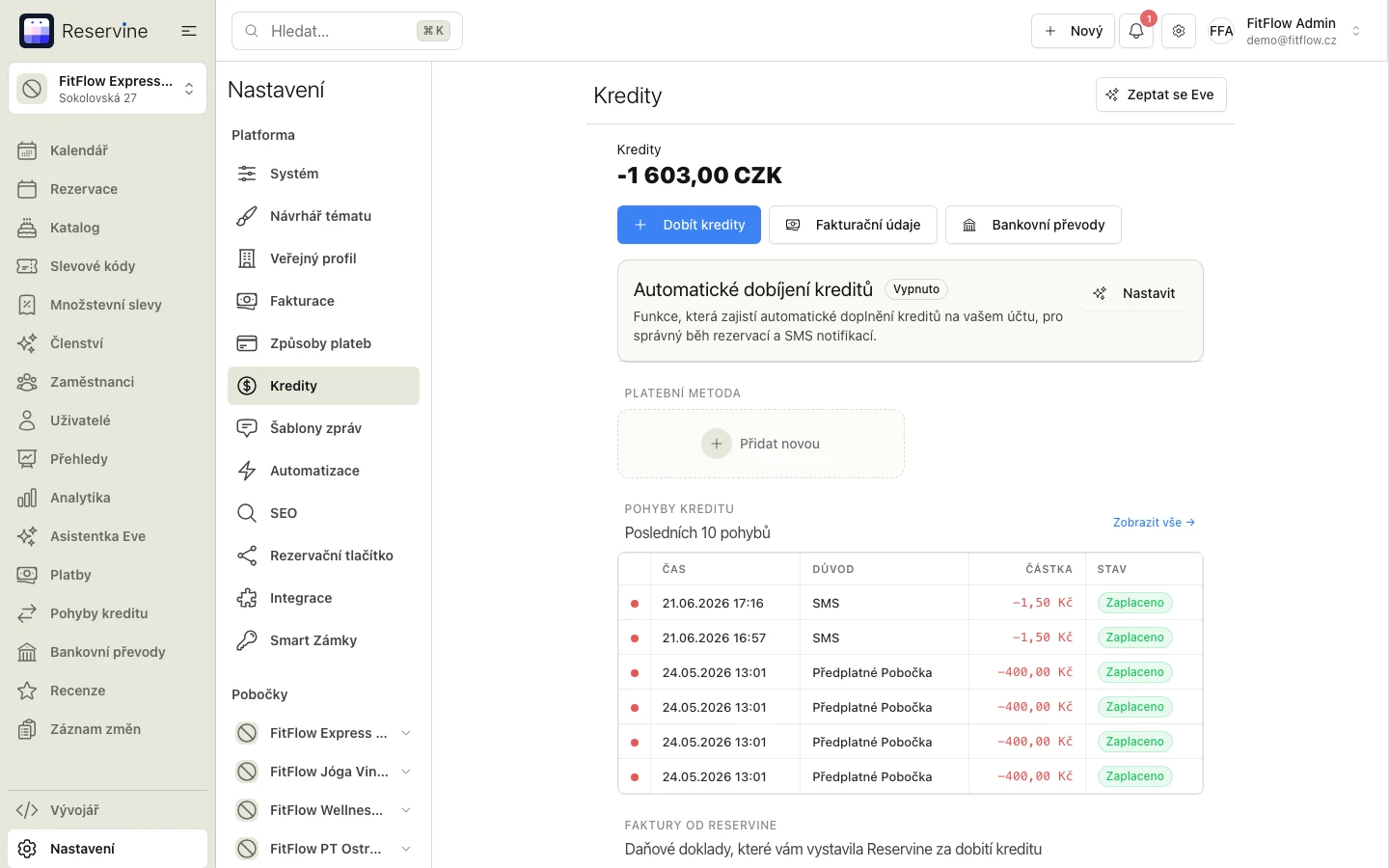
Credits are the account's operating balance. They are drawn for SMS messages to clients and for subscriptions to paid extensions. When they run out, SMS stop going out, and that usually shows only when a client did not get a reminder.
Where to find it
- Settings → Credits (Nastavení → Kredity): balance, top-up, automatic top-up, latest transactions and invoices from Reservine.
- Credit transactions in the main menu: the complete history of all transactions.
- Settings → Billing (Nastavení → Fakturace): your company's billing details.
What credits are used for
| Purpose | When it is deducted |
|---|---|
| SMS | Every SMS sent: confirmation, reminder, a message to the customer from the reservation detail. |
| Subscription | A monthly or one-time payment for an active extension, e.g. smart locks. |
The indicative price of one SMS is roughly 1.5 CZK; you see the exact amount next to each transaction.
Topping up credit
- Open Settings → Credits and click Top up credits.
- Enter the amount. The admin shows the minimum top-up amount.
- Pick the payment method: Payment card or Bank transfer (the admin generates payment details with a note; credits are added after the payment is received).
- Confirm. The tax document appears in the Invoices from Reservine section.
A bank transfer requires billing details. If you do not have them filled in, the admin first sends you to Settings → Billing.
Automatic credit top-up
Automatic top-up watches the balance for you. When it drops below the set threshold, Reservine tops up the set amount.
- In Settings → Credits open Automatic credit top-up and click Set up.
- Enter the Minimum balance to trigger a top-up (the threshold).
- Enter the Top-up amount. The Calculate recommended amount button suggests it based on your average monthly consumption.
- Optionally set the Maximum top-up amount. The admin warns you when it is lower than the estimated monthly consumption.
- Confirm Yes, top up credits automatically when the balance drops below a certain threshold.
You turn it off with the Turn off automatic top-up button in the same place.
If you send SMS regularly, enable automatic top-up right away. It is considerably safer than watching the balance by hand.
Credit transactions and invoices
- Credit transactions on the Credits page show the last 10 transactions with the time, operation type, reason (SMS, subscription, top-up), amount and status. The Show all link opens the full history.
- Invoices from Reservine are the tax documents for credit top-ups. You can download each one.
The invoices you issue to clients for reservations are elsewhere: see Invoices.
Billing details
In Settings → Billing fill in the details that are printed on documents from Reservine:
- company name
- company ID and VAT ID
- email and phone
- address (street, city, postcode, country)
For Czech companies enter the company ID (IČO) and let the details be filled in from the ARES register. It saves time and eliminates typos.
Most common problems
| Problem | What to check |
|---|---|
| SMS are not going out | The credit balance; top up or enable automatic top-up. |
| The transfer was not credited | The payment note must match the generated one; crediting takes time depending on the bank. |
| Automatic top-up did not happen | The maximum top-up amount is not lower than the top-up amount. |
| An invoice is missing | Documents are created only for credit top-ups; subscriptions are deducted from credit. |
Related pages
- Extensions: what is paid from credit.
- Notifications: which SMS are sent to clients.
- Invoices: documents for your clients.