Time slots and reservation modes
Overview of the three reservation display modes - flexible duration, fixed blocks and scheduled blocks - how to pick the right one and what switching does.
Time slots and reservation modes
The reservation display mode determines how the client picks a slot: freely from–to, from fixed blocks of the same length, or from blocks scheduled at specific times. It is set per branch and applies to branches with the Space rental booking model.
Where to find it
In the admin open Settings → your branch → Reservations (Nastavení → provozovna → Rezervace). The mode switch is at the very top of the page.
The three modes side by side
| Mode | What the client picks | Typical use | In detail |
|---|---|---|---|
| Flexible duration | The start and end time themselves | Studios, courts, spaces billed by time | Flexible time slots |
| Fixed blocks | One of the blocks of equal length | Rental in fixed units, standard visits | Fixed time slots |
| Scheduled blocks | A block you listed at a specific time | Classes, shifts, workshops | Scheduled time slots |
Setup steps
1. Choose the reservation display mode
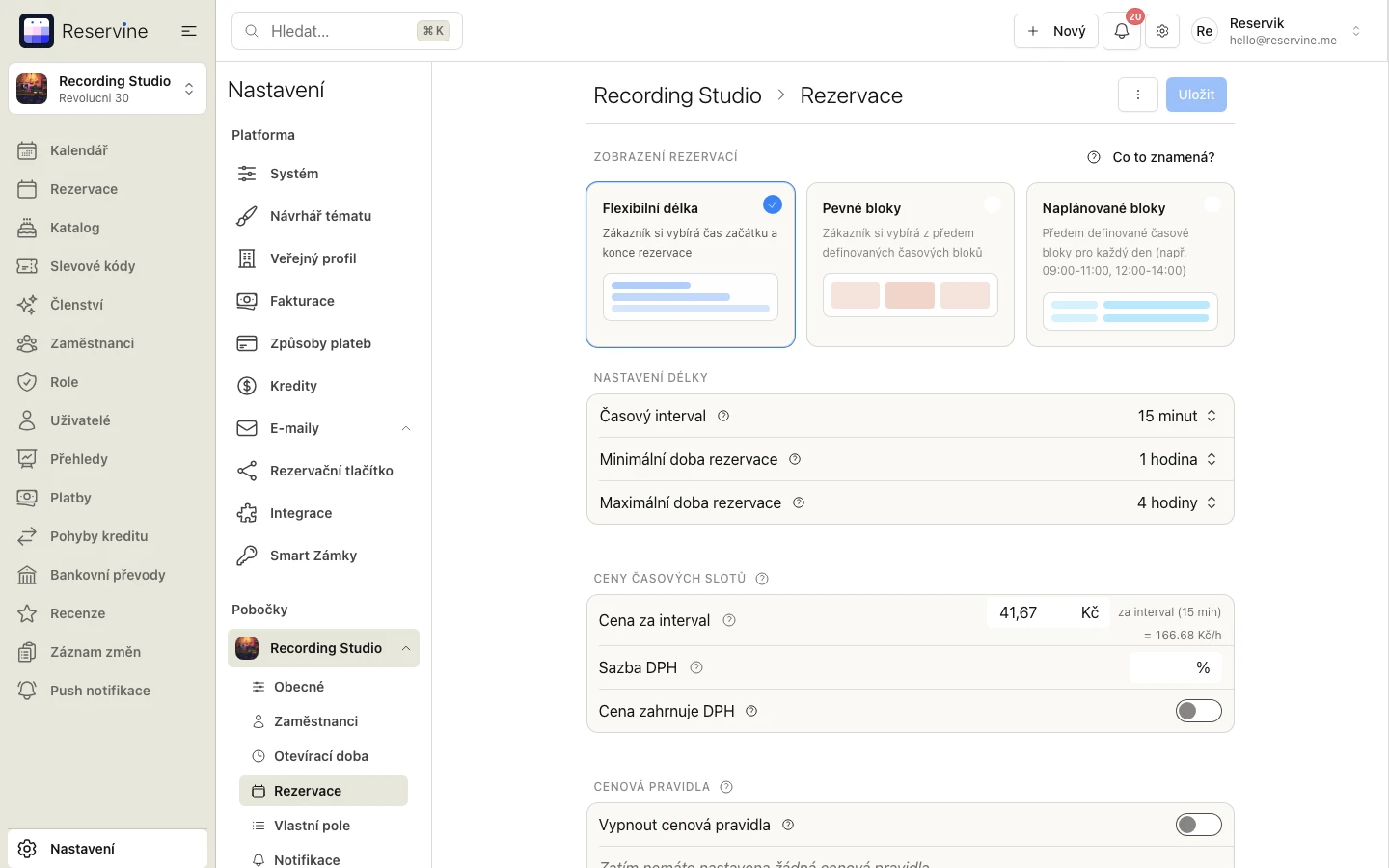
In the admin open Settings → your branch → Reservations. At the top choose one of the three modes:
- Flexible duration (1) – the client picks the start and end time themselves; ideal for studios and spaces billed by time.
- Fixed blocks (2) – the client picks from predefined time blocks of equal length.
- Scheduled blocks (3) – blocks laid out for each day (e.g. 09:00–11:00, 12:00–14:00); suits classes and shifts.
2. Set the interval and reservation durations
In the Duration settings section you define the calendar step and the reservation bounds: the Time interval is the smallest step by which a reservation moves (e.g. 15 minutes), the Minimum and Maximum reservation duration bound how short and how long a reservation the client may create.
The interval keeps the calendar readable: for hourly businesses 30–60 minutes is enough, a finer interval makes sense only where bookings really happen by the quarter hour.
3. Save and check the booking page
Confirm the changes with the Save button in the top right and open your public booking page – the new mode takes effect immediately. Try creating a test reservation so you see exactly what the client sees. The First reservation page describes the steps.
How to pick the right mode
Ask yourself three questions:
- Does the client determine the duration, or do you? If the client, choose flexible duration. If you, continue.
- Are all blocks the same length and do they repeat all day? Then fixed blocks are enough.
- Do blocks start at specific times that differ from day to day? Then you need scheduled blocks.
Flexible duration gives the client the most freedom; blocks keep capacity under control and simplify operations.
What happens when you switch modes
You can change the mode at any time. Existing reservations remain valid – the new mode only affects how clients pick slots from the change onwards. When switching, the admin warns you that the time slots will be regenerated and that pricing rules tied to the original blocks may not make sense after the change.
After switching, therefore always check:
- the pricing rules and the price per interval or block,
- the first and last slot of the day within the opening hours,
- one test reservation on the public page.
Switching the mode on a branch already in operation is not a cosmetic change. It practically always changes the behaviour of prices and the display of slots, so do it outside peak hours and with a test reservation right after.
Frequently asked questions
Can I have different modes for different branches? Yes. Reservation settings are per branch. Each branch can have its own mode, interval and durations.
What happens to existing reservations when the mode changes? Nothing. Reservations already created remain valid. The new mode only affects how clients pick slots from the change onwards.
Does the mode also apply to a branch with Service appointments? No. With Service appointments the slot duration is determined by the service and the employee's availability, see Booking model.